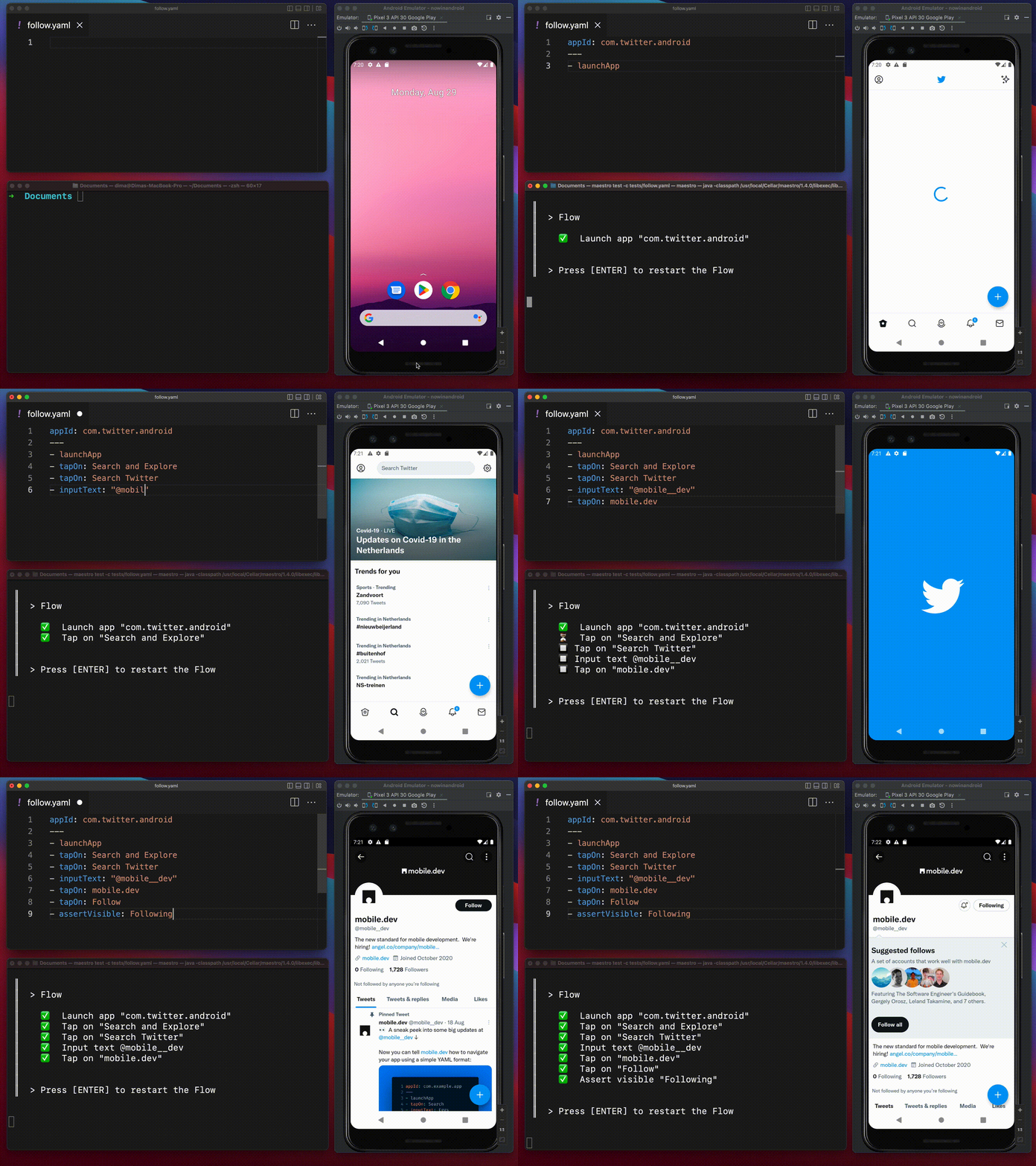
# What is Maestro?

Maestro is the simplest and most effective open-source UI automation framework for mobile and web. It is designed to allow developers and testers to define and automate user journeys with a level of reliability and ease that traditional tools cannot match.

<figure><img src="/files/X1bhQ6R8DOGxKqLjKPwE" alt=""><figcaption></figcaption></figure>

Traditional testing tools often require deep instrumentation, access to the app's source code, and a strong coding ability. Maestro changes this by operating at "[arm's length](/get-started/how-maestro-works.md#the-arms-length-philosophy)," piloting the device, not the app, scrolling and tapping like a real user would through the same accessibility layer that real users rely on. This eliminates framework dependencies, allowing you to test any app, regardless of whether it was built with React Native, Flutter, or Native code.

### Why choose Maestro?

<table data-view="cards"><thead><tr><th></th><th></th></tr></thead><tbody><tr><td><i class="fa-shield">:shield:</i> <strong>Built-in Tolerance</strong></td><td>Maestro embraces the instability of mobile devices by automatically handling flakiness and UI settling.</td></tr><tr><td><i class="fa-timer">:timer:</i> <strong>Zero-Wait Intelligence</strong></td><td>No more manual <code>sleep()</code> calls. Maestro automatically waits for network content and animations to load.</td></tr><tr><td><i class="fa-file">:file:</i> <strong>Declarative Syntax</strong></td><td>Tests are defined in human-readable YAML files, removing the need for deep programming knowledge.</td></tr></tbody></table>

<table data-card-size="large" data-view="cards"><thead><tr><th></th><th></th></tr></thead><tbody><tr><td><i class="fa-rocket-launch">:rocket-launch:</i> <strong>Blazingly Fast Iteration</strong></td><td>Tests run without compilation. Maestro can monitor your files and rerun flows instantly upon saving.</td></tr><tr><td><i class="fa-box">:box:</i> <strong>Single Binary Setup</strong></td><td>Maestro is a single tool that works anywhere, avoiding the "setup hell" associated with legacy drivers.</td></tr></tbody></table>

{% hint style="success" %}
🚀 **Running in the cloud**

Ready to wire into CI or scale up your testing? Start running your flows on [Maestro Cloud](https://maestro.dev/cloud). Check the Cloud documentation to run tests in the cloud and integrate with your CI pipeline.
{% endhint %}

### Maestro vs competitors

While tools like Appium or Selenium treat testing like unit tests inspecting internal APIs, Maestro treats your app as a black box. By simulating "human thumbs on a screen," Maestro validates the complete user experience stack, including interactions with system settings and notifications.

### Ready to start?

Explore the core components of the Maestro ecosystem and begin your journey:

<table data-card-size="large" data-view="cards"><thead><tr><th></th><th></th><th data-hidden data-card-target data-type="content-ref"></th></tr></thead><tbody><tr><td><strong>How Maestro works</strong></td><td>Understand the "arm's length" philosophy and accessibility-first element detection.</td><td><a href="/pages/P05NwN6Aox1FpJgtQRoy">/pages/P05NwN6Aox1FpJgtQRoy</a></td></tr><tr><td><strong>QuickStart guide</strong></td><td>Install Maestro Studio and run your first test in under five minutes.</td><td><a href="/pages/IyVjUYlja4evcymb2uG3">/pages/IyVjUYlja4evcymb2uG3</a></td></tr><tr><td><strong>Maestro solutions</strong></td><td>Compare the Maestro CLI, Maestro Studio (IDE), and Maestro Cloud to find the right tool for your workflow.</td><td><a href="/pages/epPDXejAMuAN8YhVc0iR">/pages/epPDXejAMuAN8YhVc0iR</a></td></tr><tr><td><strong>Supported platforms</strong></td><td>View the full list of supported frameworks, including Jetpack Compose, SwiftUI, and Web.</td><td><a href="/pages/Yji3ZRqXunrjvcov0BhZ">/pages/Yji3ZRqXunrjvcov0BhZ</a></td></tr></tbody></table>


---

# Agent Instructions: Querying This Documentation

If you need additional information that is not directly available in this page, you can query the documentation dynamically by asking a question.

Perform an HTTP GET request on the current page URL with the `ask` query parameter:

```
GET https://docs.maestro.dev/get-started/what-is-maestro.md?ask=<question>
```

The question should be specific, self-contained, and written in natural language.
The response will contain a direct answer to the question and relevant excerpts and sources from the documentation.

Use this mechanism when the answer is not explicitly present in the current page, you need clarification or additional context, or you want to retrieve related documentation sections.
